Tole
Localities (tole) used in student and teacher addresses.
A tole is a locality or neighbourhood. It is the tole choice on student and teacher addresses and in student reports.
Where it is used
- Student and teacher address fields
- Student reports
Before you start
- Add the toles around your school before admitting students.
The list page
Open Main Entry → Tole from the sidebar, or click the Tole card on the Main Entry dashboard.
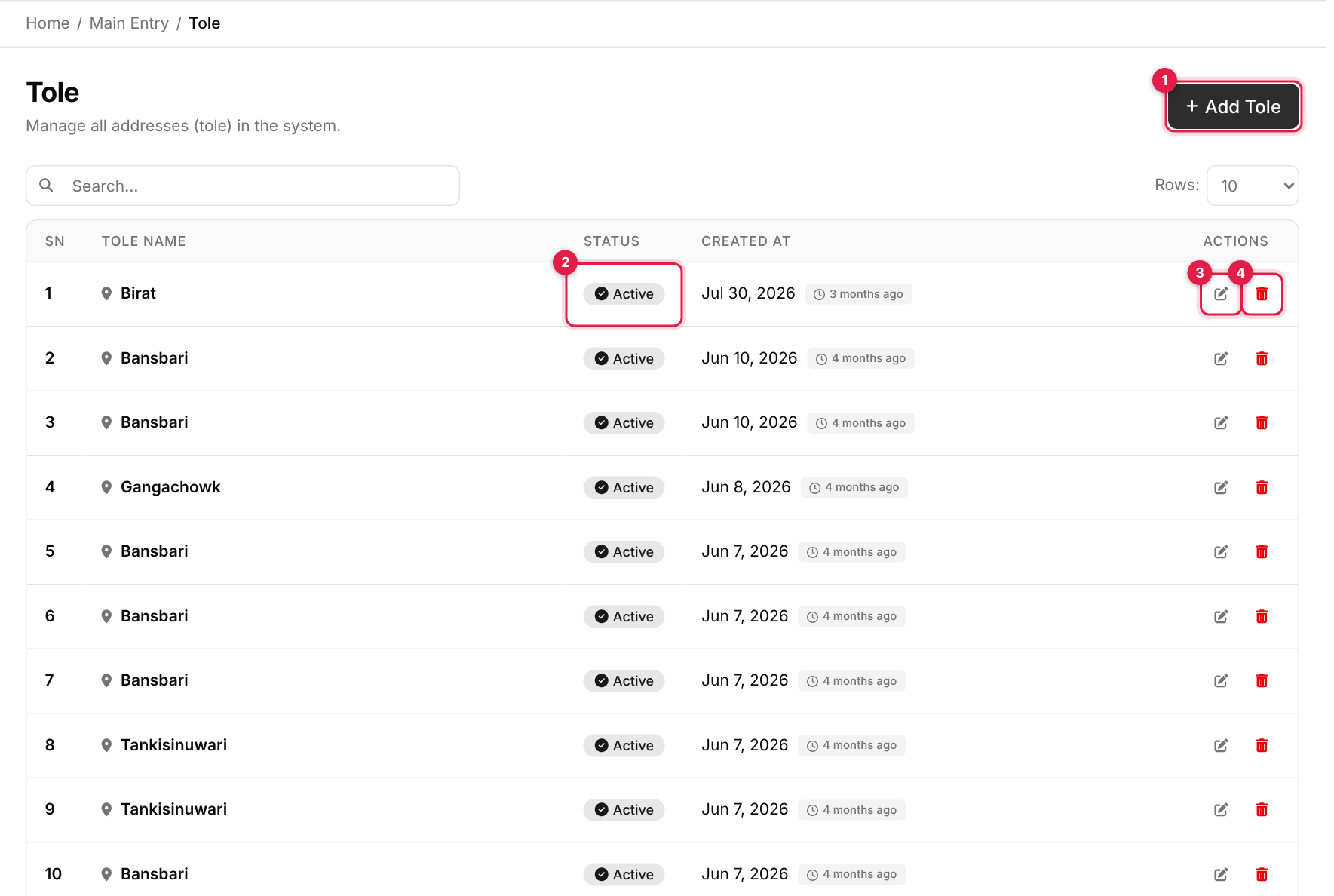
- 1Add Tole opens the form in a panel on the right.
- 2Status: green Active or grey Inactive. It is read-only here; change it from the edit form.
- 3Edit (pencil) opens the same form with the record filled in.
- 4Delete (red bin) removes the record after a confirmation.
| Column | Shows |
|---|---|
| SN | Row number on the current page (it restarts at 1 on each page). |
| Tole Name | The locality name. |
| Status | Active or Inactive. Inactive rows appear faded. |
| Created At | The date the record was added. |
| Actions | Edit and delete buttons. You only see the ones your role allows. |
Known issue: search box
The search box on this page is shown but does not narrow the list yet. Use Rows and the page buttons under the table to move around.
Add a tole
-
1
Open the form
Click Add Tole (callout 1 above). A panel slides in from the right. -
2
Fill in the details
Complete the fields below. The numbers match the callouts in the screenshot.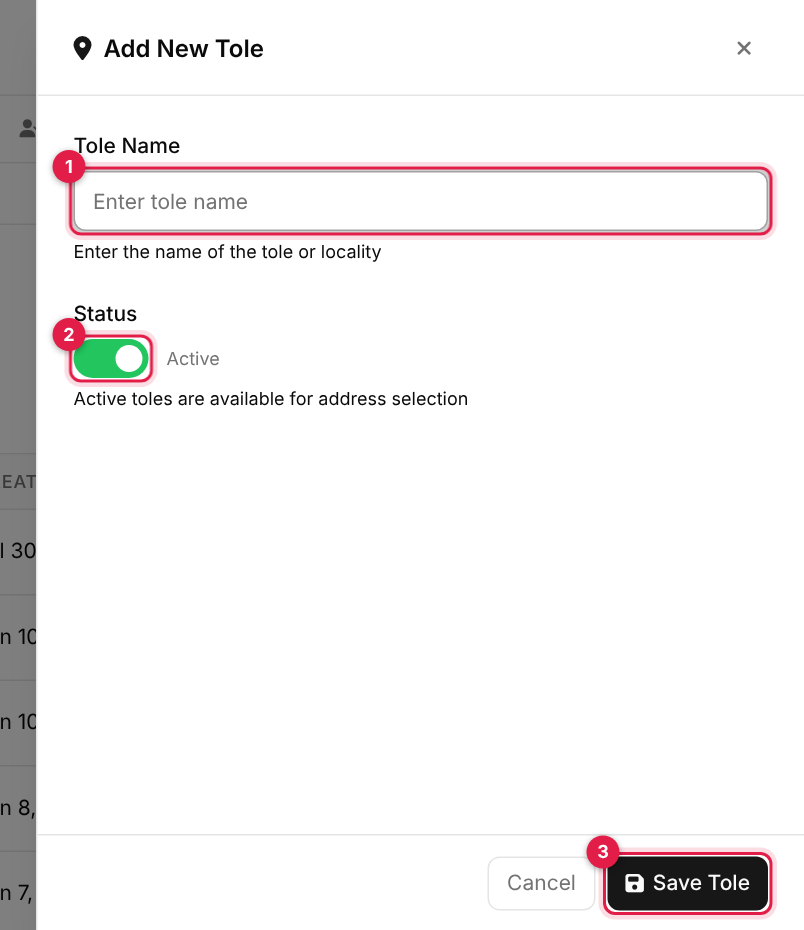
The add form for tole # Field Required What to enter 1 Tole Name Yes At least 2 characters. 2 Status No On (default) = available for address selection. -
3
Save
Click Save Tole (the last callout). On success the panel closes, the list refreshes and a green Success message appears. If something is wrong, a red Error message lists the problems and the panel stays open so you can fix them. Cancel, the × or a click outside the panel closes it without saving.
Edit tole
-
1
Open the record
Find the row and click the pencil icon in the Actions column (callout 3). -
2
Change and update
The panel opens as Edit Tole with the current values filled in. Change what you need and click Update Tole.
Deactivating instead of deleting
To retire a tole without losing history, edit it and switch Status off. It stays in the list as Inactive and drops out of the dropdowns that use it.
Delete tole
-
1
Click the bin
Click the red bin icon in the Actions column (callout 4). -
2
Confirm
Your browser asks you to confirm. Click OK to delete or Cancel to keep it.
Deleting is permanent
Deleted records cannot be restored. If it has already been used elsewhere in the system the delete may be refused with An error occurred. Please try again. Mark it Inactive instead.
Messages you may see
| Message | What it means |
|---|---|
| <name> created successfully! | The record was added. |
| <name> updated successfully! | Your changes were saved. |
| Data deleted successfully! | The record was removed. |
| The slug has already been taken. | A record with the same name already exists. Names are compared ignoring capitals, spaces and punctuation, so Grade 1, grade 1 and Grade-1 count as the same. |
| An error occurred. Please try again. | The save or delete was refused, for example because the record is still in use elsewhere. |